
Summary
The System Summary page provides an overview of the basic information associated with an AI system. The page is used when creating a new system and when updating the information of an existing system.
Create a New System
Section titled “Create a New System”Users with the Risk Manager or Governance Officer role can create a new system.
To create a system:
- Open the Systems Dashboard.
- Click + New in the top-right corner of the page.
- Enter the required system information on the System Summary page.
- Save the system to create it in Pacific AI.
When a new system is created, the information entered on the System Summary page becomes the basic system information used throughout Pacific AI.
Each system must include the following information:
- System Name: A unique name used to identify the system.
- Description: A short description of the system and its purpose.
- Version: The current version of the system.
- Keywords: Relevant keywords or tags that help users identify and search for the system.
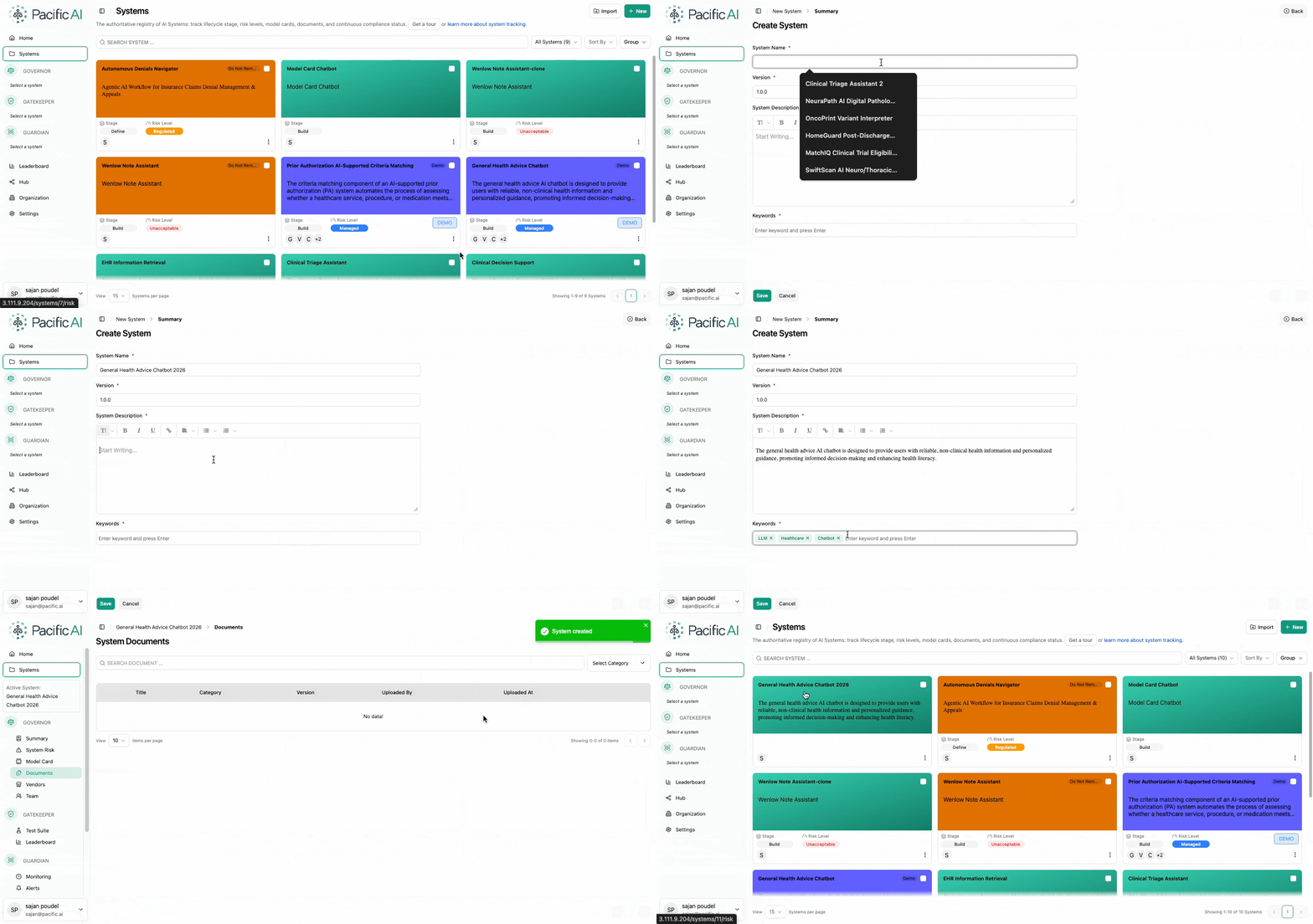
This information provides a consistent reference for the system across Pacific AI and supports identification, search, and version tracking.
Update System Information
Section titled “Update System Information”The System Summary page can also be used to update information for an existing system.
Users with the Risk Manager or Governance Officer role can update the system summary information. Changes made to the system information are reflected wherever the system details are displayed within Pacific AI.
Users should keep the system name, description, version, and keywords up to date to ensure that the system information remains accurate and useful for governance and management activities.