
System Documents
Building software systems in healthcare and regulated industries demands a documented, standards-driven process from conception to deployment. Development begins with requirements gathering-capturing functional needs alongside non-functional constraints like security, compliance, and performance-and proceeds through implementation guided by frameworks such as HIPAA, FDA regulations, and ISO standards.
Comprehensive documentation is legally required throughout: architecture documentation justifies design decisions, QA documentation demonstrates validation rigor, release documentation ensures reproducibility, and operational documentation enables safe maintenance.
Testing is equally critical and, for AI systems using LLMs, legally mandated. Beyond traditional software validation, AI systems require bias detection, safety evaluations, accuracy benchmarking, and robustness testing as specified by FDA guidance, the EU AI Act, and frameworks like CHAI certification. This documented testing evidence isn’t optional-it’s a regulatory requirement to ensure patient safety and legal compliance.
For Pacific AI, System Documents serve as the foundation for governance, risk analysis, model card generation, and compliance reporting.
After a new system is created, users are automatically redirected to the Documents page, where all system-related documentation is managed.
Uploading Documents
Section titled “Uploading Documents”Risk Manager can upload & manage relevant documentation for a specific System they created. During upload, the following information is required:
- Title - A clear and descriptive document name
- Category - The document classification
- Version - The document version for traceability
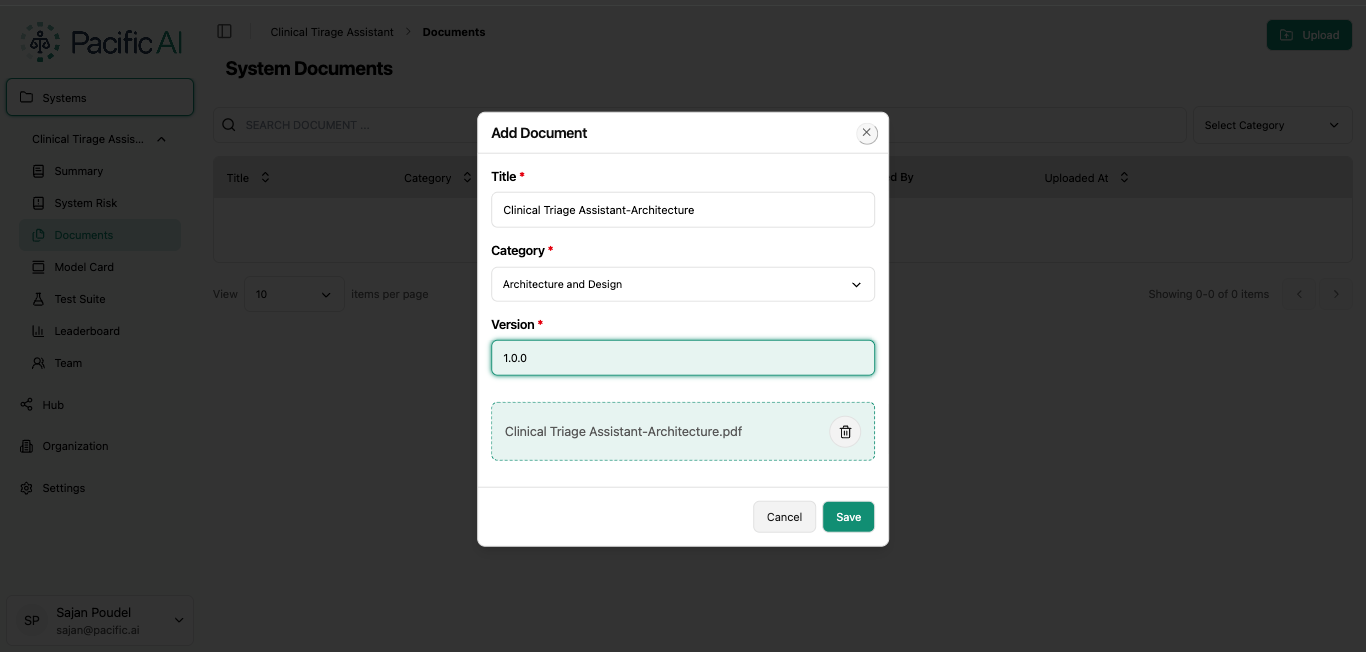
Supported file formats include:
- Plain Text
- Word Document
Versioning ensures that updates to architecture, quality processes, or operational procedures can be tracked over time.
Document Categories
Section titled “Document Categories”Each document must be assigned to one of the following categories:
- Architecture and Design - Technical design, data flow, model architecture, infrastructure diagrams, etc
- Quality Assurance - Validation reports, testing documentation, performance results, etc
- Release - Deployment records, release notes, change logs, etc
- Operation - Monitoring procedures, maintenance documentation, operational guidelines, etc
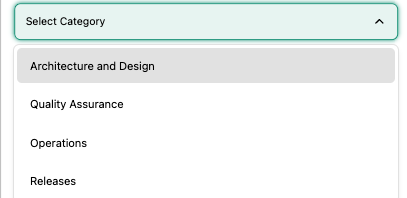
Proper categorization enables structured analysis during Risk Assessment and Model Card generation.
Managing Documents
Section titled “Managing Documents”The Documents page allows users to:
- View uploaded documents
- Download documents
- Delete outdated versions (subject to permissions). Users must provide the reason for deletion while trying to delete a System Document.
- Maintain multiple versions of the same document
When a large number of documents exist, users can use the search and filter functionality to quickly locate specific documents by title or category.
Using Pacific AI and the Risk Registry generated by the application will help Risk Managers to create / gather accurate and complete documentation, improving transparency, strengthening governance workflows, and being compliant with all internal policies and regulatory requirements.